
Manage Your Ravelry Store and Sources
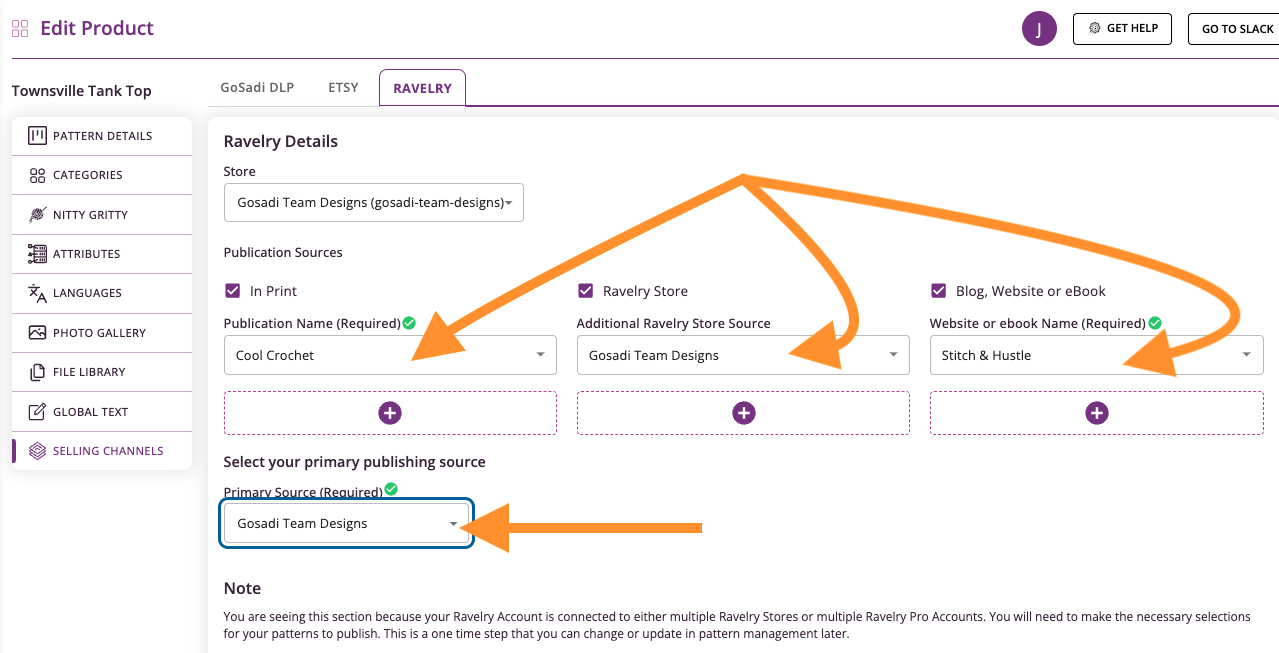
GoSadi manages your Ravelry store and publication sources for you. When you publish patterns to Ravelry through GoSadi, you'll set your store, add any additional sources, and choose your primary source. This determines where your pattern PDF lives and which sources appear on your Ravelry pattern page.
Set Up Store and Sources on Existing Patterns
1. Navigate to your pattern in the Product Library
2. Click on the Selling Channels tab
3. Select Ravelry from the channel options
4. Your Store will already be selected from your Ravelry connection
5. Under Publication Sources, check Additional Ravelry Store Source if you want to add your store as an additional source
6. Add any other publication sources:
Blog, Website, or eBook
In Print
Any collaboration sites

7. Select your Primary Publishing Source from the dropdown
This determines which source appears first on your Ravelry pattern page
8. Click Sync or Publish to Ravelry
How Sources Appear on Ravelry
After publishing, your pattern will show:
Your store as the default source (where the PDF lives)
Additional sources you added listed below the store
Free patterns will show the free site link
Set Up Store and Sources on New Patterns
When publishing a new pattern or converting a free pattern to paid:
1. Navigate to the pattern's Selling Channels tab
2. Click on Ravelry
3. Click the Store dropdown (it will say "Self-Published Store" by default)
4. Select your Ravelry store from the dropdown
IMPORTANT: You must select your store if you want to send the pattern PDF to Ravelry. Some designers have multiple stores, which is why GoSadi requires you to choose which store receives the PDF.

5. Add your store as an Additional Ravelry Store Source if desired
6. Add any other publication sources (blogs, websites, collaborations, etc.)
7. Select your Primary Publishing Source
8. Click Publish to Ravelry
GoSadi will send both
The pattern PDF to your selected Ravelry store
Links to any free sites or additional sources you added
NOTE: Store and source are technically different on Ravelry. Your store is where the PDF lives. Sources are all the places your pattern is available.
Other helpful Ravelry tips
Your Primary Publication Source - A Primer
Housekeeping on Ravelry
To explore all the features and benefits that GoSadi has to offer, visit our website today!