
Refreshing Your Etsy Connection
So that we can offer Etsy as a selling channel on our platform, GoSadi must abide by the API commercial requirements set forth by Etsy. These requirements allow GoSadi designers to connect with Etsy from GoSadi, maintain the integrity of their data, safeguard user privacy, and foster a fair relationship between GoSadi and Etsy. Part of those requirements mean that GoSadi designers need to re-establish their connection - an electronic “handshake” of sorts - between GoSadi and Etsy. Here’s how you do that to keep your Etsy data fresh and current on the GoSadi platform.
Refreshing Your Etsy Shop Data on GoSadi
Every 6 hours, your Etsy connection “lapses” rendering it (and your Etsy-GoSadi products) "stale" in accordance with Etsy API terms, prompting the need for a refresh. We've made this process incredibly easy for you so you can keep your connection and your products up to date.
Product Library
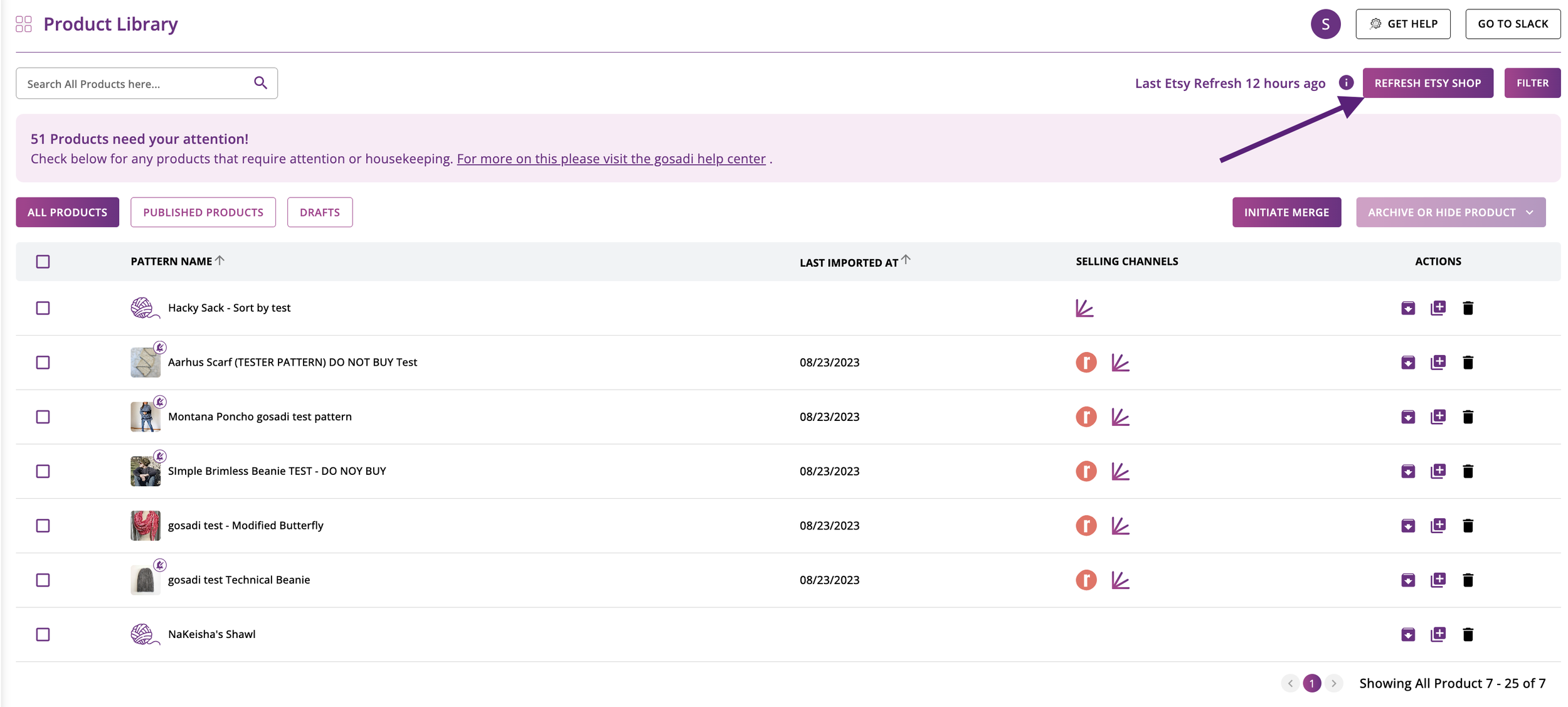
If the last sync was more than 6 hours ago, a message at the top of your Product Library screen will prompt you to refresh your Etsy data. Click the Refresh Etsy Shop button to initiate a refresh and auto-import from Etsy.
NOTE: Without refreshing your Etsty connection, you will not be able to publish edits, updates, or even publish a new pattern to your Etsy Selling Channel through GoSadi as Etsy sees a broken connection. Remember, this refresh doesn’t replace or overwrite any data, it’s simply re-establishing the connection and telling Etsy that yes, you do want GoSadi and Etsy to be connected.
Why Is a Refresh Needed
Whether you've made edits to your products or not, numerous variables within Etsy's ecosystem might render your pattern details stale or outdated. Here's why a refresh is essential:
Data Accuracy
Etsy's inventory and shop data undergo frequent changes due to factors like sales, updates, and new listings and other behind-the-scenes activities. Refreshing your data ensures that the information on GoSadi accurately reflects the current state of your Etsy shop.
Compliance
As part of our commitment to complying with Etsy's API commercial requirements, we must maintain up-to-date data for your shop. This commitment ensures a consistent and reliable experience for both GoSadi and Etsy users.
System Efficiency
Regular data refreshes enhance the efficiency and responsiveness of our system, which enhances the experience for all GoSadi users.
I've Made No Changes, Why Is My Data Considered Stale
Per Etsy API terms, your data is always considered "stale" after 6 hours and requires a refresh. This practice guarantees that you work with the most current and accurate information. Factors that can affect your shop's data include:
Other Sellers
Changes in other shops might indirectly impact how your shop data is presented.
Listing Updates
Updates to listings similar to yours can influence your shop's visibility or relevance.
By prompting you to refresh your data, we ensure that you’re maintaining the latest information in GoSadi, while keeping our platform compliant with Etsy's requirements.
Why Do My Etsy Listings Show a Faded Etsy Logo
To remain compliant with Etsy API policies, GoSadi will “dim” the Etsy logo on your Etsy patterns until you refresh your data.
To explore all the features and benefits that GoSadi has to offer, visit our website today!