
How To Schedule Pattern Releases Using GoSadi
GoSadi's Scheduler lets you set a specific date and time for your patterns to publish across any of your connected selling channels. Schedule all channels at once, or stagger releases across different ones.
What is Scheduler?
Scheduler is a GoSadi feature that lets you:
Set a future date and time for pattern publication
Publish to multiple channels simultaneously or on different dates
Schedule pattern releases in advance and let GoSadi handle the rest
Change or cancel scheduled publications anytime before they go live
Create and Schedule a Pattern
1. Go to Product Library
2. Click Create a New Product
3. Click on Pattern Details and complete the prompts (craft, pattern name, etc.)
4. Work your way through the remaining tabs (Categories, Nitty Gritty, and so on)
5. When you reach the Selling Channels tab, complete the information for each of your Selling Channels
a. Add descriptions for each Selling Channel
b. Add Pricing
c. Use GoSadi SMARTS!™ for optimized text (optional)
d. Add Selling Channel photos and file
6. Click Save Draft as you complete each Selling Channel section
NOTE: At the bottom of each channel section, you'll see You can publish instantly or schedule on the next screen. If you choose to schedule your pattern and later make changes to it, every time you save your draft, your changes are being saved to your scheduled release.
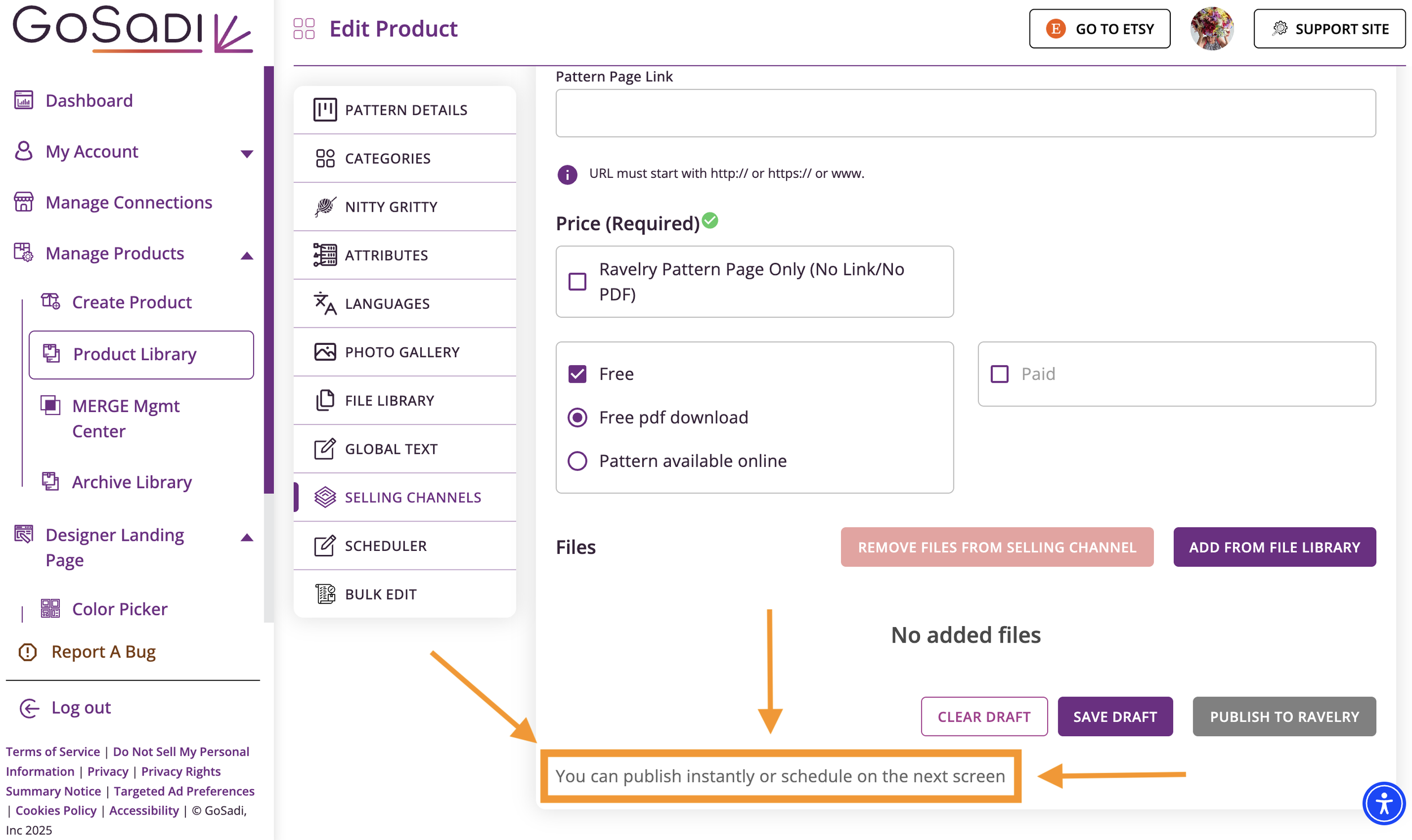
7. Navigate to the Scheduler tab next
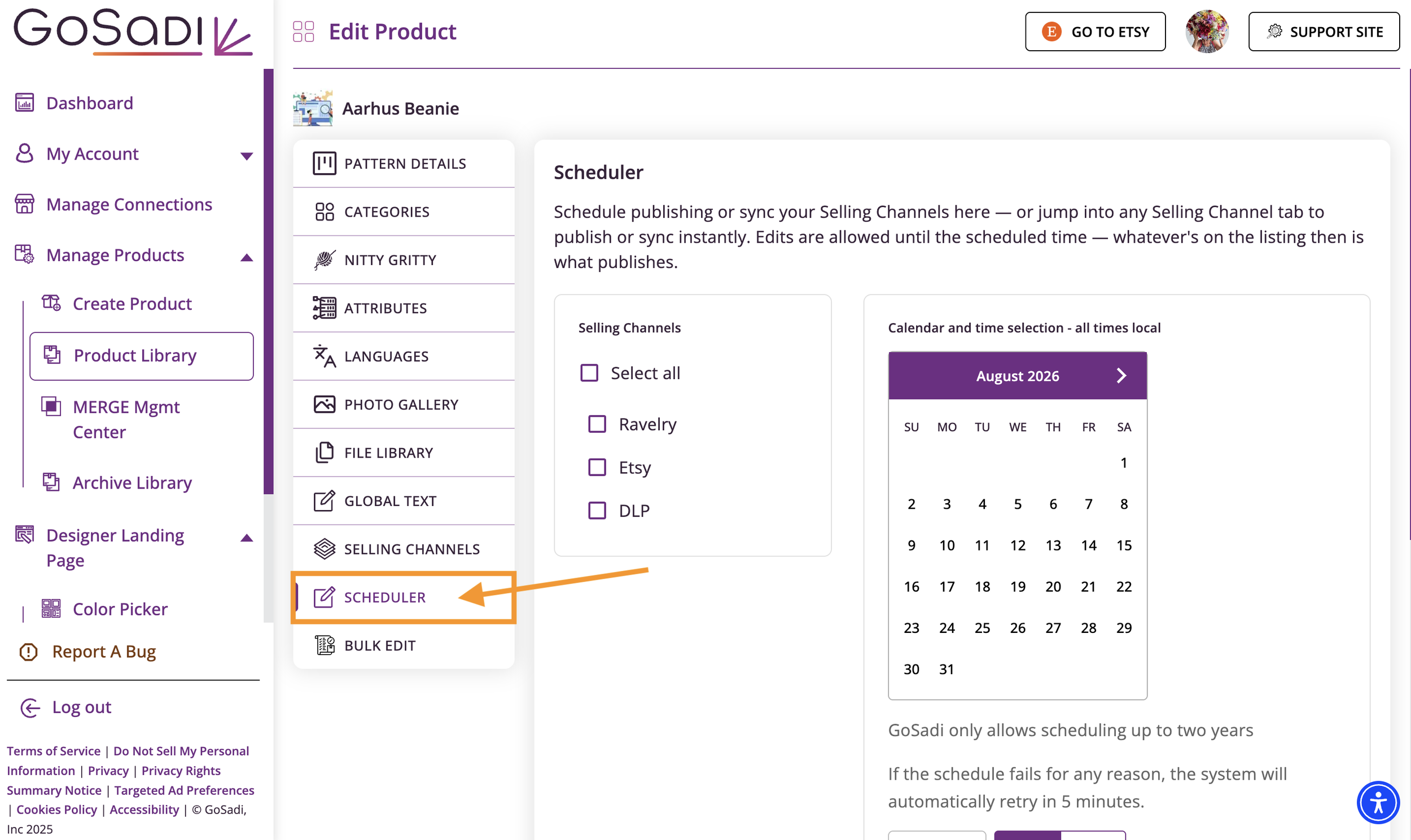
8. Select which channels you want to publish to
a. Check GoSadi DLP if publishing to your Designer Landing Page
b. Check Ravelry if publishing there
c. Check Etsy if publishing there
d. Check WooCommerce, Shopify, or any connected channel
9. Click Schedule
10. Choose your publication date and time
a. Pick the date you want it to go live
b. Pick the specific time (e.g., 5 PM)
11. Click Schedule
You'll see confirmation that your publication is scheduled.
NOTE: You can schedule different channels to publish on different dates. This is helpful if you have shared rights or want to stagger your releases.
Schedule Different Dates for Different Channels
If you want to publish to some channels now and others later, you can do that.
1. In the Scheduler tab, select only the channels you want to publish first
2. Click Schedule and set the date/time for those channels
3. Go back and create another schedule for the remaining channels
4. Set a later date/time for those
EXAMPLE: Publish your pattern to Ravelry on June 1st with your publishing partner. Schedule Etsy to publish on June 1st of next year when your shared rights agreement ends.
Check Your Scheduled Patterns
Your patterns show their scheduling status in two places.
Within the Scheduler tab for that pattern and
At the top of each Selling Channel page for the pattern
NOTE: Since you made changes to your pattern, but haven’t yet published it, you'll also see exclamation points (!) next to patterns that have unpublished work in your Pattern Library. This includes patterns that are scheduled but not yet live. Once your pattern publishes at the scheduled time, the exclamation points disappear.
Manage Scheduled Publications
You can change or cancel a scheduled publication anytime before it goes live.
1. Go to Product Library
2. Click on your pattern
3. Go to Scheduler
4. Look for your scheduled publication details and make the changes you want.
Change the date/time
Update when it publishes
Cancel the schedule
Stop the scheduled publication
Override the schedule
Publish immediately instead of waiting
Use Cases for Scheduler
Coordinate with partners on releases
Publish to your partner's store first
Schedule your Etsy release for the same day
Stagger other channels as needed
Manage shared rights
Publish immediately to your partner's store
Schedule your own channels for later when rights revert back to you
Build anticipation
Announce a pattern in advance
Schedule the release for launch day at a specific time
All your channels go live simultaneously
Staggered releases
Release on Ravelry first (Monday)
Release to Etsy later (Friday)
Manage inventory or pricing across channels strategically
To explore all the features and benefits that GoSadi has to offer, visit our website today!